
Omnimed AI Integration Guide
Integrate Omnimed AI report dictation into your RIS, HIS or viewer.
1. Widget
Drop a <script> v2 tag into your page and give it getToken: your backend exchanges the Partner Credential for a 1-hour, per-doctor token. The report can be auto-inserted into the active editor.
Use this if: you want the fastest integration and are happy with the default recording UI.
2. Direct API
POST an audio file to /api/omni-ai from your server, with your Partner Credential as a Bearer, and handle the response yourself.
Use this if: you need full control over the recording UI or are integrating from a native/desktop client.
Quick start
Base URL: https://api.omniai.com.ar
-
Request your Partner Credential from [email protected]. It is an
omp_...secret shown only once: store it as an environment variable on your server. See Onboarding a partner. -
Make the first call. From your server, with a test recording:
curl -X POST https://api.omniai.com.ar/api/omni-ai \
  -H "Authorization: Bearer $OMNI_PARTNER_CREDENTIAL" \
  -F "[email protected]" \
  -F "medical_center_id=YOUR_CENTER_ID" \
  -F "username=dr.perez"
To use the Widget in the browser, your backend exchanges the credential for a per-doctor token and the page receives it through
OmniWidget.init({ getToken })(see Widget v2). -
Read the response. The report is in
data.reports[0].report_html; keepdata.metadata.study_idif you will refine it later (see Success response).
Authentication
Each integration partner receives from Omnimed AI a Partner Credential (omp_...), enabled for one or more centers. Each center has its medical_center_id, which identifies its templates, language and report style.
Partner Credential (server-to-server)
When your server calls the API directly, it sends the credential as a Bearer on every call and names the center and the doctor in the form:
Authorization: Bearer omp_...: your Partner Credential. Only on your server (environment variable, secret manager); never in the browser.medical_center_id: a center your credential is enabled for.username: the declared user (see below).
/api/omni-ai/refine and /api/omni-ai/addendum take the same header and the same medical_center_id.
An Authorization: Bearer header whose value starts with neither omp_ nor omw_ is ignored: the call is treated as carrying no credential.
Widget token
The Widget runs in the doctor's browser, so it never receives the Partner Credential. Your backend exchanges it for a Widget token (omw_...) with POST /api/widget/token, for one center and one doctor, and hands it to the page. The token lasts one hour and is valid for a single doctor of a single center. The Widget sends it as Authorization: Bearer omw_... on every call and, when it expires, asks your page for a new one through getToken().
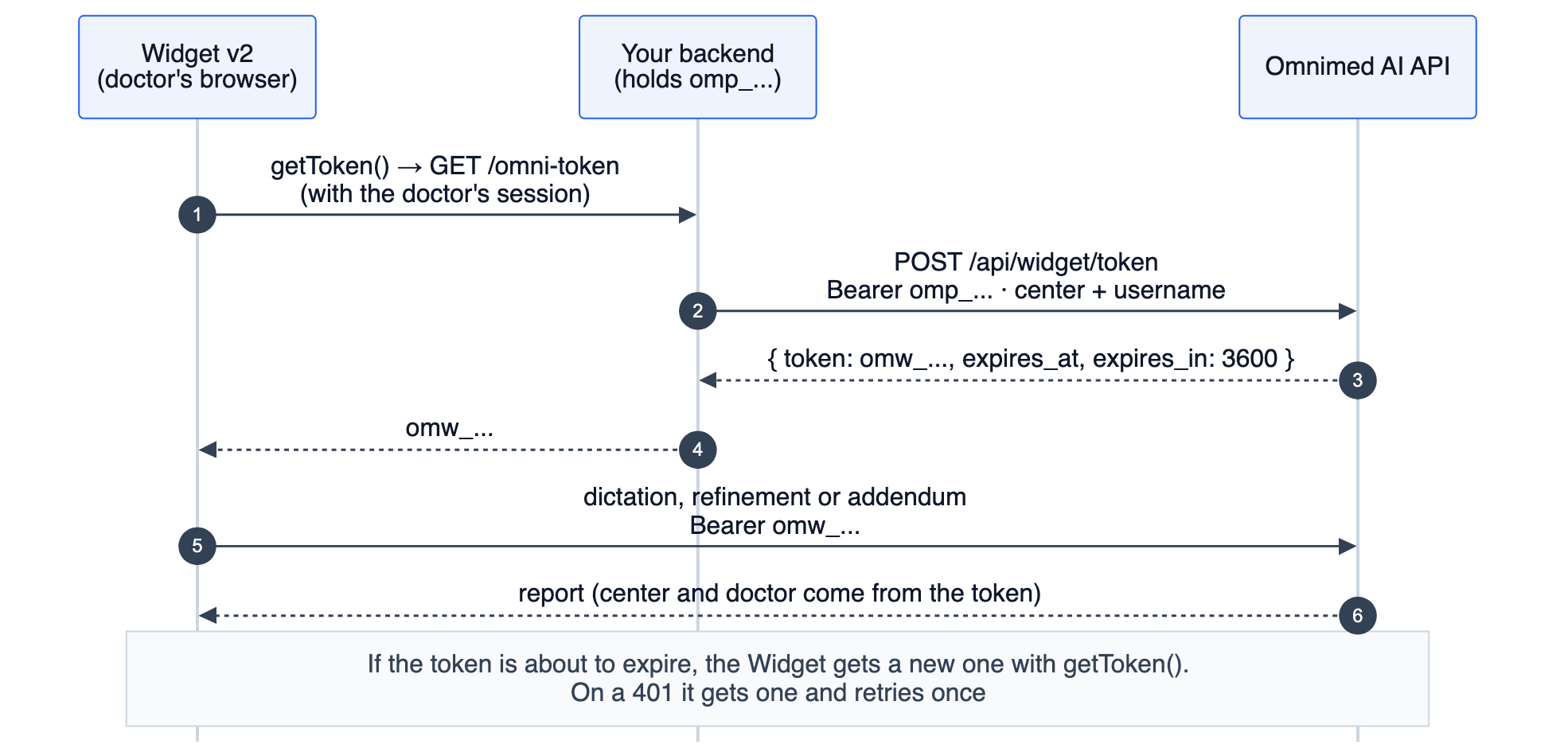
With a Widget token, the center and the doctor come from the token: if the call also sends medical_center_id or username, they are ignored.
A token is not revoked on its own: it expires after an hour. What gets revoked or rotated is the Partner Credential, and the tokens it issued stop working in under 60 seconds.
Declared user (username)
username is the doctor's username in the center (the same login they use in the desktop app). Your system declares it with its credential: we do not authenticate that doctor, we take your word for it within the centers you are enabled for. It decides which templates the dictation's template is chosen from:
username | Templates the choice is made from |
|---|---|
| absent (direct API only) | The center's general templates only |
| a user of the center | The general ones plus those assigned to that doctor (directly or through a group) |
| a user the center does not know | General templates only; the call is tracked under the declared name |
A user is never created from a username. Decide it in your backend from your own session, never from something the browser sends: that way a doctor cannot act on behalf of another.
Widget v2
1. Your backend requests the token
POST https://api.omniai.com.ar/api/widget/token
Authorization: Bearer omp_...
Content-Type: application/json| Where | Field | Required | Description |
|---|---|---|---|
| Header | Authorization: Bearer omp_... | Yes | Your Partner Credential. Only on your server |
| JSON body | medical_center_id | Yes | The center the Widget acts for (the same ID as in v1). Must be enabled for your credential |
| JSON body | username | Yes | The doctor using the Widget, by their username in the center (declared user). A token is per doctor |
| JSON body | user_id | No | Your own doctor ID; only recorded |
200 response:
{
  "token": "omw_eyJhbGciOiJIUzI1NiIsInR5cCI6IkpXVCJ9...",
  "expires_at": "2026-10-14T18:32:10Z",
  "expires_in": 3600
}token: the Widget token, to hand to the page.expires_at: expiry, ISO 8601 (UTC). You can cache the token per doctor until then instead of requesting one on every page load.expires_in: seconds until expiry.
cURL
curl -X POST https://api.omniai.com.ar/api/widget/token \
  -H "Authorization: Bearer $OMNI_PARTNER_CREDENTIAL" \
  -H "Content-Type: application/json" \
  -d '{"medical_center_id": "YOUR_CENTER_ID", "username": "dr.perez"}'
Node (Express)
An endpoint on your backend that returns the token as plain text for the signed-in doctor. Uses native fetch (Node 18+).
// OMNI_PARTNER_CREDENTIAL=omp_...  (environment variable, never in the front end)
app.get('/omni-token', requireLogin, async (req, res) => {
  const r = await fetch('https://api.omniai.com.ar/api/widget/token', {
    method: 'POST',
    headers: {
      Authorization: `Bearer ${process.env.OMNI_PARTNER_CREDENTIAL}`,
      'Content-Type': 'application/json',
    },
    body: JSON.stringify({
      medical_center_id: req.user.omniCenterId, // e.g. 'YOUR_CENTER_ID'
      username: req.user.username,              // the doctor of this session
      user_id: String(req.user.id),             // optional
    }),
  });
  if (!r.ok) {
    // 401: invalid or revoked credential; 403: center not enabled (see Errors)
    return res.status(502).send(await r.text());
  }
  const { token } = await r.json();
  res.type('text/plain').send(token);
});
The Widget calls getToken() only right before its first upload, not when the page loads: a misconfigured token endpoint only shows up once the doctor has finished dictating. Test it from your backend (for example with the cURL above) before going live.
2. Initialize the Widget in the page
<script src="https://api.omniai.com.ar/static/widget/v2/omni-widget.min.js"></script>
<script>
  OmniWidget.init({
    // Called by the Widget before the first upload and whenever the token expires.
    getToken: () =>
      fetch('/omni-token', { credentials: 'include' }).then((r) => {
        if (!r.ok) throw new Error('Could not get the Omnimed AI token');
        return r.text();
      }),
    onReport: ({ html, text, recordingId }) => {
      // Insert the report into your editor (see "Auto-insert the report")
    },
  });
</script>
A floating recording button is injected in the bottom-right corner. The doctor taps it, dictates, stops, and the Widget shows the generated report.
No data-center-id on the <script>. If the tag still carries data-center-id (from a v1 integration), the Widget starts on its own in v1 mode when it loads, and a later OmniWidget.init({ getToken }) is ignored with an "Already initialized" warning in the console. In v2 the center and the doctor come from the token; centerId or username passed to init are ignored.
- If you already have a token when rendering the page, you can pass it too:
OmniWidget.init({ token: 'omw_...', getToken }). The Widget uses it first and only callsgetToken()when it expires. - With
tokenalone, withoutgetToken, the Widget works for one hour and then shows an error. Always passgetToken. - For a different doctor (user switch in your product), call
OmniWidget.destroy()andinitagain with agetTokenthat fetches the new doctor's token.
init option | Description |
|---|---|
| getToken | Function that returns (or resolves to) the omw_... token as text. Always recommended |
| token | Initial token, optional |
| apiUrl | API base URL. Defaults to the origin the script was loaded from (https://api.omniai.com.ar) |
| onReport | Callback with the report, same as the omniai:report event |
| onAudio | Callback with the raw recording, same as the omniai:audio event |
| onAddendum | Callback with the addendum, same as the omniai:addendum event |
| addendumButton | false hides the Widget's Addendum button (shown by default) |
Auto-insert the report
The Widget emits omniai:report (and calls onReport) when the report is ready, every time the doctor clicks Insert, and after every refinement. event.detail carries html, text and the dictation's recordingId. Since the same dictation can arrive several times, your code must replace what it already inserted for that recordingId instead of adding another copy:
// One container per dictation: the next event for the same recordingId replaces it.
window.addEventListener('omniai:report', (event) => {
  const { html, recordingId } = event.detail;
  const editor = document.querySelector('#report');
  let block = editor.querySelector(`[data-omni-recording="${recordingId}"]`);
  if (!block) {
    block = document.createElement('div');
    block.dataset.omniRecording = recordingId;
    editor.appendChild(block);
  }
  block.innerHTML = html; // report HTML, sanitised server-side
});
Keep a copy of the audio
If your system must retain the original dictation (e.g. legal retention in the PACS), the Widget hands you the raw recording the moment the doctor stops, before uploading it, so your copy exists even if processing fails. Listen for omniai:audio or pass onAudio to init:
window.addEventListener('omniai:audio', (event) => {
  const { blob, mimeType, kind, recordingId, parentRecordingId } = event.detail;
  // e.g. upload the blob to your storage, with your study ID + recordingId
});| Field | Description |
|---|---|
| blob | The recording (Blob), usually WebM/Opus (Ogg or MP4 in browsers without WebM) |
| mimeType | MIME type of the blob |
| durationSeconds | Length of the recording |
| sizeBytes | Size of the blob |
| kind | "dictation", "refinement" (a spoken correction) or "addendum" |
| recordingId | Unique ID of this recording. The omniai:report and omniai:addendum payloads carry the same recordingId, linking audio and result |
| parentRecordingId | On a refinement, the recordingId of the dictation it corrects; null otherwise |
| recordedAt | ISO 8601 timestamp |
The blob does not leave your page through this event: storing it is up to your code.
Addendum on an already-signed report
When the doctor has already signed the report in your system and needs to add something to it (a missed finding, or the comparison with prior studies the patient brought), they open an addendum instead of dictating a new report. The Widget records and the API returns only what was dictated, as paragraphs, with no title and in the center's report language; you append it to the report with your own heading, date and signature. The signed report is never changed. No template is chosen, there is no "Refine" and addenda do not consume credits.
<button id="add-addendum">Add addendum</button>
<script>
  // 1. Your button opens the addendum and the Widget starts recording right away.
  document.getElementById('add-addendum').addEventListener('click', () => {
    OmniWidget.openAddendum({
      signedReport: myViewer.signedReportHtml(), // optional: HTML or text, as you hold it
      externalStudyId: myViewer.accessionNumber(), // optional: your study ID
    });
  });

  // 2. When the doctor clicks "Insert", the addendum arrives for you to append.
  window.addEventListener('omniai:addendum', (e) => {
    const { html, text, externalStudyId, transcription } = e.detail;
    myViewer.appendAddendum(externalStudyId, {
      title: 'ADDENDUM',                    // the heading is yours
      date: new Date(),
      signature: myViewer.currentDoctor(),
      body: html,                           // or `text` if your field is plain text
    });
  });
</script>openAddendum()returns a promise resolving totrueif it started recording, orfalseif a dictation was already in progress (the doctor has to finish or cancel it first).signedReportis optional. If your system cannot send it, the addendum works the same (see what the signed report is used for).externalStudyIdis stored as-is in our records, so support can locate the addendum, and comes back in the event so you know which study it belongs to. It is never matched against our studies.- The result is shown in the Widget read-only, with Copy, Insert and Dictate again. To correct it, the doctor dictates again and the new result replaces the previous one.
omniai:addendum(andonAddendumininit) fires only when Insert is clicked, once per click: each event is one addendum to append.- The Widget also shows an Addendum button next to "Omnimed AI", which opens an addendum with no signed report or study ID. If you prefer to use only your own button, hide it with
OmniWidget.init({ ..., addendumButton: false }).
omniai:addendum field | Description |
|---|---|
| html | The addendum as HTML (paragraphs, no title) |
| text | The same addendum as plain text |
| transcription | The transcribed dictation |
| externalStudyId | The one you passed to openAddendum, or null |
| recordingId | The same as the omniai:audio of that recording (which arrives with kind: "addendum") |
| eventId | Event ID in our records, for support |
Token renewal
The Widget renews on its own:
- Before each call, if the token expires in less than 30 seconds, it requests a new one with
getToken(). - If the API still answers
401, it callsgetToken()once and repeats the same call with the same audio. - If the second attempt also returns
401, it shows the error in the panel with a Retry button. The dictation is not lost: it stays in the Widget until the doctor retries, records another one or closes the panel (and it was already handed to your page throughomniai:audiobefore upload).
If getToken() throws or does not return text, the Widget shows "No se pudo obtener el token del Widget: ..." with the same Retry button.
Widget lifecycle
| State | Meaning |
|---|---|
| idle | Ready to record |
| recording | Microphone active |
| paused | Recording paused |
| processing | Audio uploaded, generating report |
| result | Report visible in the panel |
| error | Processing or the token failed; the doctor can retry or record again |
Browser and network requirements
- HTTPS (required for microphone access).
- Permission granted for
navigator.mediaDevices.getUserMedia. - Maximum length of a recording: 10 minutes.
- If your page uses a Content Security Policy, allow
https://api.omniai.com.arinscript-src(the Widget script) and inconnect-src(its API calls). - The
/static/widget/v2/omni-widget.min.jsfile receives backward-compatible fixes without changing URL, so for now we do not publish Subresource Integrity (SRI) hashes to pin it.
Direct API
Every call in this section is made from your server with Authorization: Bearer omp_... (or from the Widget with its omw_... token).
The Widget uses this API to generate the report (POST /api/omni-ai) and the addendum (POST /api/omni-ai/addendum). It does not refine through /api/omni-ai/refine: it transcribes the correction with /api/transcription/transcribe-upload and applies it with /api/reports/refine, with the same token. From your server, refine with /api/omni-ai/refine.
Generate a report
POST https://api.omniai.com.ar/api/omni-ai
Authorization: Bearer omp_...
Content-Type: multipart/form-data
Parameters
| Parameter | Type | Required | Description |
|---|---|---|---|
| file | File | Conditional | Audio file (wav, mp3, m4a, ogg, flac, webm), up to 100 MB. Required unless transcription_text is sent |
| transcription_text | String | Conditional | Dictation text used instead of audio (see below). Required unless file is sent |
| medical_center_id | String | Yes | A center enabled for your credential. Not needed with a Widget token, and ignored |
| username | String | Recommended | Declared user: the doctor's username in the center. The template is chosen from those visible to that doctor (general + assigned). Absent or unknown: general only. Ignored when template_html is sent |
| user_id | String | No | Doctor/user identifier for analytics |
| language | String | No | Does not change the language: dictation and report use the center's language. Only echoed back as language_detected when the input is transcription_text |
| metadata | String (JSON) | No | Free-form JSON metadata, max 10KB |
| dicom_metadata | String (JSON) | No | The ordered study, from the order / DICOM headers; triggers the mismatch warnings (see below) |
| template_html | String (HTML) | No | Preselected template: generate the report against exactly this template (see below) |
| template_name | String | No | Label of the preselected template; echoed back as study_name / template_used |
| include_template | Boolean | No | Return the HTML of the template the server used, for diff highlighting |
| include_rtf | Boolean | No | Return an RTF version of each report |
Note: Without template_html, the study is detected automatically from the transcription and the template is chosen from the center's stored templates: you do not need to send the study name.
Several studies in one dictation: reports always has one entry. When the doctor dictates several studies, their reports come concatenated in that single report_html, study_name / template_used list them comma-separated, and metadata.is_multi_study is true.
Sending text instead of audio (transcription_text)
If your system already has the dictation as text (typed, or transcribed on your side), send it as transcription_text and omit the audio. The transcription step is skipped and the text enters the pipeline exactly where the transcription would: study detection, template choice and generation behave the same. It combines naturally with template_html (no transcription and no template choice: the fastest, fully deterministic path).
- Audio always wins. If you send both, the audio is transcribed and
transcription_textis ignored entirely. There is no fallback: if the audio fails to transcribe (e.g. a muted microphone) the call errors even though you sent text. - A blank
filefield or a blanktranscription_text("" or whitespace) is treated as absent. Sending neither returns a 400. - Plain text, max 50KB.
- In the response:
duration_secondsis0.0,speaker_countis1,language_detectedis the value of thelanguagefield ("spa"if you do not send it), andmetadata.input_sourceis"text"(vs"audio"). - Billing does not change: a report generated from text consumes a credit exactly like one generated from audio.
Sending your own template (template_html)
When your system knows which template the report must follow (per clinic, per referring center, per modality), send it in the call:
- Study detection and template choice are skipped entirely: the report follows your template deterministically.
- The result is always a single report, even if the dictation mentions several studies.
- The HTML is sanitised server-side before use; the maximum size is 100KB. HTML that is too large, or markup that is empty after sanitisation, returns a 400. A blank field ("" or whitespace) is treated as absent: the call follows the normal template-choice path.
- HTML is the recommended format: it preserves bold, headings and block structure.
- In the response:
template_match_confidenceis1.0andmetadata.detection_sourceis"preselected_template". - With
include_template=true, the response'stemplate_htmlis the sanitised template the server actually used: diff against that one, not your original.
Success response
A call without template_html, with the template chosen automatically:
{
  "success": true,
  "message": "Successfully processed audio and generated 1 report(s)",
  "data": {
    "transcription": "...",
    "language_detected": "spa",
    "duration_seconds": 42.1,
    "speaker_count": 1,
    "reports": [
      {
        "study_name": "IRM de Rodilla",
        "template_used": "IRM de Rodilla",
        "template_match_confidence": 0.91,
        "report_html": "<p>...</p>",
        "report_rtf": null,
        "transcription_segment": "...",
        "template_html": null
      }
    ],
    "warnings": [],
    "context_checks": {
      "laterality": {"status": "skipped", "reason": "no_context"},
      "modality": {"status": "skipped", "reason": "no_context"},
      "region": {"status": "skipped", "reason": "no_context"}
    },
    "processing_time_ms": 7441,
    "metadata": {
      "study_id": 12345,
      "detection_source": "auto_detect",
      "input_source": "audio",
      "is_multi_study": false,
      "...": "..."
    },
    "dicom_metadata_used": null
  },
  "timestamp": "2026-10-14T15:32:10.123456"
}data.reports[0].report_html: the report.data.metadata.study_id: keep it if you will refine this report later.data.dicom_metadata_used: thedicom_metadatathat was used, as parsed, ornullif none was sent.metadatamay gain new keys over time: parse the response tolerantly.
Mismatch warnings (laterality, modality, region)
Send the ordered study in dicom_metadata and the API compares it with what the doctor dictated. A discrepancy comes back in data.warnings; the report is generated exactly the same and is never changed or blocked because of it. Neither side is assumed correct: the order can be wrong too.
{
  "dicom_modality": "CT",
  "dicom_bodypart": ["HAND"],
  "dicom_laterality": "R",
  "dicom_series_description": ["TC MANO DERECHA"]
}dicom_modality(required ifdicom_metadatais sent): DICOM Modality (CT,MR,DX/CR,US,MG).dicom_bodypart: DICOM Body Part Examined, one value (HAND,KNEE,SHOULDER,FOOT,BREAST, ...). Region is checked for extremities and breast; the rest not yet.dicom_laterality:R,LorB(derecha/izquierda/bilateralalso accepted). If absent, the side is read fromdicom_series_descriptionwhen it spells it out (DER,IZQ,DERECHA,LEFT, ...).- Free-form context, such as the clinical indication, goes in
metadata: it is context for the report, not input to these checks.
Each warning:
{
  "code": "LATERALITY_MISMATCH",
  "study_name": "custom",
  "context_value": "R",
  "dictated_value": "L",
  "evidence": "quinto metacarpiano del pie izquierdo",
  "message": "El estudio está indicado como derecho y se dictó izquierdo."
}code:LATERALITY_MISMATCH,MODALITY_MISMATCHorREGION_MISMATCH.context_value/dictated_value: lateralityR/L; modalityRX,TC,RM,ECO,MAMO; region a Spanish key such asmano,pie,rodilla,muneca.evidence: literal fragment of the dictation, when there is one.message: in Spanish, ready to show the radiologist.
context_checks says, per check, whether it ran: ok, mismatch, or skipped with a reason (no_context: not sent; unmapped: a value we do not check yet; not_dictated: the doctor did not say it; bilateral_context: the order is bilateral; llm_unavailable: the check did not finish in time). An empty warnings with skipped checks means "not verified", not "verified OK".
The checks are calibrated to avoid false alarms: when in doubt they stay silent. Mentioning the other side for comparison ("compared with the left knee") or another modality as a suggestion ("MRI is suggested") are not discrepancies.
Examples
Every field that carries HTML (template_html, report_html, signed_report) goes with --form-string in cURL: with -F, a value starting with < or @ is read as a file.
cURL
curl -X POST https://api.omniai.com.ar/api/omni-ai \
  -H "Authorization: Bearer $OMNI_PARTNER_CREDENTIAL" \
  -F "[email protected]" \
  -F "medical_center_id=YOUR_CENTER_ID" \
  -F "username=dr.martinez"
cURL (preselected template)
curl -X POST https://api.omniai.com.ar/api/omni-ai \
  -H "Authorization: Bearer $OMNI_PARTNER_CREDENTIAL" \
  -F "[email protected]" \
  -F "medical_center_id=YOUR_CENTER_ID" \
  -F "username=dr.martinez" \
  --form-string "template_html=<h2>IRM de Rodilla</h2><p>...</p>" \
  -F "template_name=IRM de Rodilla" \
  -F "include_template=true"
Python
import os
import requests

url = "https://api.omniai.com.ar/api/omni-ai"
headers = {"Authorization": f"Bearer {os.environ['OMNI_PARTNER_CREDENTIAL']}"}

with open("audio.m4a", "rb") as f:
    response = requests.post(
        url,
        headers=headers,
        files={"file": f},
        data={
            "medical_center_id": "YOUR_CENTER_ID",
            "username": "dr.lopez",
        },
        timeout=120,
    )

response.raise_for_status()
result = response.json()

for report in result["data"]["reports"]:
    print(report["study_name"], "->", report["report_html"])
JavaScript (Node 18+, on your server)
async function processAudio(audioBlob, centerId, username) {
  const form = new FormData();
  form.append('file', audioBlob, 'dictation.webm');
  form.append('medical_center_id', centerId);
  form.append('username', username);

  const res = await fetch('https://api.omniai.com.ar/api/omni-ai', {
    method: 'POST',
    headers: { Authorization: `Bearer ${process.env.OMNI_PARTNER_CREDENTIAL}` },
    body: form,
    signal: AbortSignal.timeout(120_000),
  });

  if (!res.ok) {
    const err = await res.json().catch(() => ({}));
    // Credential errors: err.detail.code; everything else: err.error
    throw new Error(err.detail?.code || err.error || `HTTP ${res.status}`);
  }

  const { data } = await res.json();
  return data.reports[0].report_html;
}
Refine a report
POST https://api.omniai.com.ar/api/omni-ai/refine
Authorization: Bearer omp_...
Content-Type: multipart/form-data
The doctor dictates a correction to an already generated report ("cambiar menisco interno por menisco externo"). The server transcribes the audio, changes only the targeted element (plus the report's Conclusion when the change affects it) and returns the updated report. Refinement never regenerates the whole report, and it is not billed.
Parameters
| Parameter | Type | Required | Description |
|---|---|---|---|
| file | File | Conditional | Audio with the dictated correction. Required unless transcription_text is sent |
| transcription_text | String | Conditional | The correction as text instead of audio (max 50KB, same rules as generation: audio wins, blank = absent) |
| medical_center_id | String | Yes | A center enabled for your credential. Not needed with a Widget token, and ignored |
| report_html | String (HTML) | Yes | The last generated report, exactly as the API returned it (or as it stood after the last refinement) |
| template_html | String (HTML) | No | The report's original template; used as a read-only style/format reference (max 100KB) |
| template_name | String | No | Template/study-type name, enables per-study-type rules |
| selected_html | String (HTML) | No | Exact HTML element to refine; omit it to let the model locate the target from the dictation |
| study_id | Integer | No | The metadata.study_id from the generation call, to trace the refinement |
| user_id | String | No | Doctor/user identifier for analytics |
| language | String | No | Accepted for compatibility and ignored: the center's language is used |
Success response
{
  "success": true,
  "message": "Successfully refined report",
  "data": {
    "transcription": "cambiar menisco interno por menisco externo",
    "report_html": "<p>...full report with the correction applied...</p>",
    "patch": {
      "refined_text": "<p>Menisco externo sin alteraciones.</p>",
      "target_html": "<p>Menisco interno sin alteraciones.</p>",
      "conclusion_text": null,
      "conclusion_original_text": null
    },
    "processing_time_ms": 3120,
    "metadata": {
      "medical_center_id": "your-center",
      "study_id": 12345,
      "event_id": "678",
      "...": "..."
    }
  },
  "timestamp": "2026-10-14T15:34:02.456789"
}data.report_htmlis the full report with the correction already applied: use it directly.data.patchdescribes the exact regions that changed, if you prefer to splice them into your own editor: replace the first occurrence oftarget_htmlwithrefined_text, and that ofconclusion_original_textwithconclusion_text(when not null).- To chain refinements, send the returned
report_htmlas the input of the next refine call.
Example
curl -X POST https://api.omniai.com.ar/api/omni-ai/refine \
  -H "Authorization: Bearer $OMNI_PARTNER_CREDENTIAL" \
  -F "[email protected]" \
  -F "medical_center_id=YOUR_CENTER_ID" \
  --form-string "report_html=<p>...last generated report...</p>" \
  --form-string "template_html=<p>...original template...</p>" \
  -F "study_id=12345"
Highlighting AI changes (client-side diff)
The Widget highlights what the AI changed by diffing the template against the generated report. You can do the same in your UI with jsdiff (diff on npm), with no server support:
import { diffWords } from 'diff';

function highlightChanges(templateText, reportText) {
  return diffWords(templateText, reportText)
    .map((part) =>
      part.added
        ? `<mark class="ai-change">${part.value}</mark>`
        : part.removed
          ? ''
          : part.value
    )
    .join('');
}- Baseline: request
include_template=trueon generation and diff against the returnedtemplate_html. - After a refine, diff the previous
report_htmlagainst the new one to highlight only the correction. - Diff the visible text (e.g. via
DOMParser) rather than raw HTML strings for cleaner highlights.
Add an addendum to a signed report
POST https://api.omniai.com.ar/api/omni-ai/addendum
Authorization: Bearer omp_...
Content-Type: multipart/form-data
The doctor has already signed the report in your system and dictates something to add to it (a missed finding, or the comparison when the patient brings prior studies). The server returns only what was dictated, as paragraphs with no title, in the center's report language. Your system adds its own heading ("ADDENDUM"), date and signature and appends it; the signed report is never changed. No template is chosen and addenda are not billed. From the Widget it is the same flow with OmniWidget.openAddendum (see Addendum on an already-signed report).
The signed report is reference only. signed_report (signedReport in the Widget) is used only to name what the doctor refers to in the report's own terms ("the upper nodule" comes out as the report names it). It is never repeated or summarised, and no measurement or finding the doctor did not dictate is ever copied.
Parameters
| Parameter | Type | Required | Description |
|---|---|---|---|
| file | File | Conditional | Audio with the dictated addendum. Required unless transcription_text is sent |
| transcription_text | String | Conditional | The addendum as text instead of audio (max 50KB, same rules as generation: audio wins, blank = absent) |
| medical_center_id | String | Yes | A center enabled for your credential. Not needed with a Widget token, and ignored |
| username | String | Recommended | Declared user; tracked on the addendum |
| signed_report | String (HTML or text) | No | The signed report as your system holds it, manual edits included (max 100KB) |
| external_study_id | String | No | Your own study identifier, stored as-is, to locate the addendum in support |
| user_id | String | No | Doctor/user identifier for analytics |
| language | String | No | Accepted for compatibility and ignored: the center's language is used |
Success response
{
  "success": true,
  "message": "Successfully generated addendum",
  "data": {
    "addendum_html": "<p>En la región mamaria derecha se identifica una lesión nodular de 12 x 9 mm.</p>",
    "transcription": "esto es una adenda, agregar una nota de que en la región mamaria derecha se identifica lesión nodular de 12 por 9 milímetros",
    "processing_time_ms": 2410,
    "metadata": {
      "medical_center_id": "your-center",
      "event_id": "678",
      "audio_id": null,
      "external_study_id": "ACC-00042",
      "input_source": "audio",
      "...": "..."
    }
  },
  "timestamp": "2026-10-14T15:40:11.789012"
}data.addendum_html: the addendum, ready to append under your heading.data.transcription: the transcribed dictation (or thetranscription_textyou sent).- To correct an addendum, the doctor dictates it again: there is no refine for addenda.
Example
curl -X POST https://api.omniai.com.ar/api/omni-ai/addendum \
  -H "Authorization: Bearer $OMNI_PARTNER_CREDENTIAL" \
  -F "[email protected]" \
  -F "medical_center_id=YOUR_CENTER_ID" \
  -F "username=dr.perez" \
  --form-string "signed_report=<p>...signed report...</p>" \
  -F "external_study_id=ACC-00042"
Errors
Errors return a non-2xx status. There are three body shapes; tell them apart by the top-level key and the type of detail.
Credential and token errors
detail is an object. Branch on detail.code, which is stable; detail.message is human-readable and may change:
{
  "detail": {
    "code": "center_not_enabled",
    "message": "La Partner Credential no está habilitada para el centro 'your-center'."
  }
}| Status | detail.code | Meaning | What to do |
|---|---|---|---|
| 401 | missing_partner_credential | POST /api/widget/token without Authorization: Bearer omp_... | Send the credential as a Bearer from your server |
| 401 | invalid_partner_credential | Unknown credential (mis-copied or rotated) | Check the value; if it was rotated, use the new one |
| 401 | partner_credential_revoked | Credential revoked. The Widget tokens it issued stop working in under 60 seconds | Ask us for a new credential |
| 401 | widget_token_expired | Widget token expired | The Widget renews it on its own if it has getToken |
| 401 | invalid_widget_token | Widget token tampered with or from another server | Request a new token with POST /api/widget/token |
| 403 | center_not_enabled | Your credential is not enabled for that medical_center_id | It is configuration on our side: write to us |
| 503 | widget_token_not_configured | A problem on our side issuing or validating tokens | Retry with backoff |
| 503 | partner_lookup_unavailable | We could not verify the credential right now. Not a rejection | Retry with backoff |
General errors
Input, center and processing, with the same shape as v1 plus a timestamp:
{
  "success": false,
  "error": "Report generation failed: ...",
  "error_code": 500,
  "timestamp": "2026-10-14T15:32:10.123456"
}
error_code usually repeats the HTTP status: branch on the status. The one specific code worth knowing is 1011 (the center has no templates), which comes with status 422. error is human-readable and may change.
| Status | Cause | What to do |
|---|---|---|
| 400 | Missing input (neither file nor transcription_text); audio under 1KB; the file extension does not match its content; unsupported audio format; metadata that is not JSON or exceeds 10KB; transcription_text over 50KB; template_html or signed_report over 100KB, or template_html empty after sanitisation; blank report_html on refine | Fix the call; retrying it unchanged will not help |
| 403 | Disabled center | Contact us |
| 422 | The center has no templates loaded (error_code 1011) | Write to us to load the center's templates |
| 500 | Transcription or report generation failed, including audio with no dictation (empty transcription, e.g. a muted microphone) | Check the recording; retry with backoff; if it persists, write to us with the timestamp |
| 502 | The model returned an empty addendum | Dictate the addendum again |
| 503 | On refine and addendum: the model is unavailable right now (error_code 503) | Retry with backoff |
Validation errors
A missing required field or one with an invalid type (e.g. medical_center_id without a Widget token, report_html on refine, or username on POST /api/widget/token) returns 422 with detail as a list, one entry per field:
{
  "detail": [
    {"type": "missing", "loc": ["body", "medical_center_id"], "msg": "Field required"}
  ]
}
Limits and operations
| Limit | Value |
|---|---|
Audio (file) | Up to 100 MB; minimum 1KB |
| Widget recording | 10 minutes |
transcription_text | 50KB |
metadata | 10KB |
template_html, signed_report | 100KB |
| Widget token lifetime | 1 hour |
- Timeout: generation can take tens of seconds on long dictations. Set a client timeout of 120 seconds or more, which is the server's timeout.
- Rate limit: there is no published per-partner limit. Retry 5xx responses with exponential backoff; do not retry 4xx responses without fixing the call.
- Credits: each generated report consumes one credit. A call that fails consumes no credit; a successful call that is repeated consumes another. Refinements and addenda consume no credits.
- Tokens: request one Widget token per doctor and cache it until
expires_at; there is no need to request one per call.
Health check
To verify connectivity from your backend. No credential required:
curl https://api.omniai.com.ar/api/healthResponse:
{
  "status": "healthy",
  "services": {
    "api": {
      "service": "api",
      "status": "healthy",
      "available": true
    }
  }
}
Onboarding a partner
- Credential. Omnimed AI issues one Partner Credential per partner and enables it for its centers. Request it at [email protected].
- Centers. Omnimed AI creates each center, with its
medical_center_id, and loads its templates from the template pack the center sends. - Doctors. Doctors (the
usernamevalues) are added in the center's admin panel. Ausernamethe center does not know still works, but only with the general templates. - Testing. On request, we enable a test center so you can integrate without touching a real center's data.
Contact: [email protected]
Migrating from v1 to v2
| v1 | v2 | |
|---|---|---|
| Direct API authentication | None: only medical_center_id | Authorization: Bearer omp_... + medical_center_id + username |
| Widget script | /static/widget/v1/omni-widget.min.js | /static/widget/v2/omni-widget.min.js |
| Center and doctor in the Widget | data-center-id / data-username on the page | Inside the token, issued by your backend |
| Widget authentication | None | Authorization: Bearer omw_... on every call, renewed through getToken() |
| Addenda | No | POST /api/omni-ai/addendum and OmniWidget.openAddendum |
| Credential errors | Do not exist | {"detail": {"code", "message"}} |
| Parameters, responses and reports | Unchanged |
Centers already on v1
Centers that already called without a credential (v1, only medical_center_id) keep working that way while they migrate. New centers must use a Partner Credential. Uncredentialed access is closed center by center, with at least 90 days' notice by email.
Steps
- Ask us for a Partner Credential at [email protected] and store it as an environment variable on your server.
- Direct API: add the
Authorization: Bearer omp_...header and sendusernamewith your session's doctor on every call. - Widget: add a backend endpoint that returns the token for the session's doctor, switch the script to
/static/widget/v2/omni-widget.min.js, removedata-center-id/data-usernamefrom the tag (if they stay, the Widget starts in v1 mode and ignores yourinit) and callOmniWidget.init({ getToken, onReport }). - Handle errors by
detail.code(especiallycenter_not_enabledandpartner_credential_revoked). - Try dictating, refining and letting an hour pass to see the token renewal.
- If you use addenda: your own button calling
OmniWidget.openAddendum({ signedReport, externalStudyId })and anomniai:addendumlistener that appends it under your heading.
The v1 documentation remains at /en/api-documentation/v1.
Changelog
v2 (2026-10-14)
- Partner Credential (
omp_...) for server-to-server calls, withusernameas the declared user. - Per-doctor Widget token (
omw_...) throughPOST /api/widget/token, and Widget v2 at/static/widget/v2/omni-widget.min.jswithgetToken. - Addenda on already-signed reports:
POST /api/omni-ai/addendumandOmniWidget.openAddendum. - Credential errors with a stable
detail.code. - v1 parameters, responses and reports are unchanged.
v1
- Widget v1 and direct API authenticated by
medical_center_idonly. See /en/api-documentation/v1.
Support
Questions, Partner Credentials and center onboarding: [email protected]